Is AORUS Secure Boot Enough? Expert Insights on BIOS Security
AORUS, GIGABYTE’s premium gaming and performance brand, integrates Secure Boot technology into its motherboards as a foundational security feature. However, the critical question remains: is AORUS Secure Boot sufficient as your primary defense against modern firmware-level threats? This comprehensive analysis explores the capabilities, limitations, and complementary security measures needed to protect your system from sophisticated attacks targeting the BIOS and boot process.
Secure Boot represents a significant advancement in preventing unauthorized code execution during system startup, yet cybersecurity experts increasingly warn that relying solely on this single layer of protection leaves systems vulnerable to advanced persistent threats, rootkits, and firmware-based exploits. Understanding what AORUS Secure Boot accomplishes and where security gaps remain is essential for building a robust defense strategy against evolving cyber threats.

Understanding AORUS Secure Boot Technology
AORUS Secure Boot is a security protocol implemented at the firmware level that verifies the digital signatures of bootloaders and operating system files before allowing them to execute during the startup sequence. This mechanism prevents malicious code from loading before the operating system takes control, theoretically blocking rootkits and bootkit infections that operate below OS-level security tools.
The technology leverages cryptographic verification using PKI (Public Key Infrastructure) standards, where firmware manufacturers maintain a database of trusted certificates. During boot, the system validates that each component attempting to load possesses a valid, recognized digital signature. If verification fails, the system either refuses to boot or alerts the user to the security violation.
GIGABYTE’s implementation includes several protective mechanisms:
- UEFI firmware verification – Validates the integrity of firmware files before execution
- Secure Boot policy enforcement – Maintains whitelists of authorized boot applications
- Certificate management – Allows custom key enrollment for enterprise environments
- Boot integrity checking – Verifies boot sector integrity against known-good states
However, security researchers from organizations like CISA (Cybersecurity and Infrastructure Security Agency) have documented numerous firmware vulnerabilities that bypass or circumvent Secure Boot protections, suggesting that this technology alone cannot be considered a complete security solution.
How Secure Boot Works in AORUS Motherboards
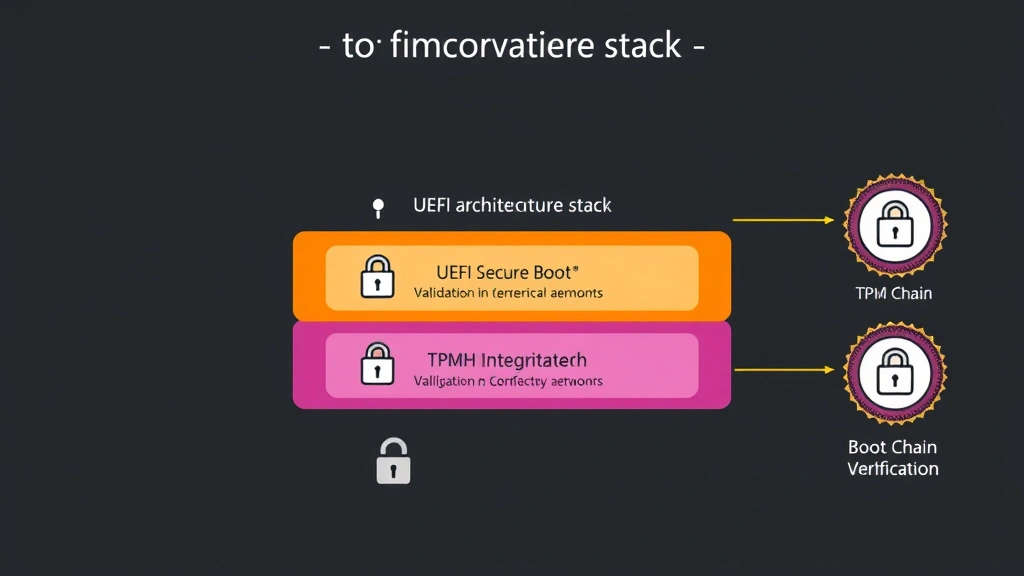
AORUS motherboards implement Secure Boot through the UEFI firmware interface, which has replaced traditional BIOS in modern systems. When you enable Secure Boot in AORUS BIOS settings, the firmware loads a chain of trust beginning with the platform firmware itself.
The boot process follows this sequence:
- System power-on initiates firmware execution from ROM
- AORUS firmware performs self-verification using manufacturer keys
- Bootloader files are checked against the Secure Boot database
- Operating system kernel and drivers undergo signature verification
- If all signatures validate successfully, boot proceeds normally
- If any component fails verification, boot halts or enters recovery mode
AORUS provides configuration options within the BIOS menu allowing users to:
- Enable or disable Secure Boot entirely
- Switch between Standard and Custom modes for key management
- Enroll custom certificates for proprietary applications
- Access detailed boot logs for troubleshooting verification failures
- Reset to factory default security keys if compromise is suspected
The system maintains a Platform Key (PK), Key Exchange Keys (KEK), and Authorized Signature Databases (DB) that collectively define what firmware considers trustworthy. This three-tier key hierarchy provides flexibility while maintaining security boundaries.
Current Limitations and Known Vulnerabilities
Despite its intended protections, AORUS Secure Boot has documented limitations that security professionals must understand:
Firmware vulnerabilities independent of Secure Boot: Researchers have discovered multiple CVEs affecting GIGABYTE firmware that allow attackers to modify BIOS settings, disable Secure Boot, or inject malicious code directly into the firmware image. These vulnerabilities exist regardless of whether Secure Boot is enabled, as they operate at the firmware level before Secure Boot validation occurs.
Supply chain compromise risks: If AORUS motherboards are compromised during manufacturing or distribution, attackers could pre-load malicious firmware that includes legitimate signing keys. Secure Boot would then trust this compromised firmware as valid, rendering the security feature ineffective.
UEFI bootkit evasion: Security researchers have demonstrated UEFI bootkit implementations that coexist with Secure Boot without triggering violations. These attacks exploit the complexity of the UEFI specification and legitimate firmware extension points to load malicious code within the trusted boot chain.
Physical attack vectors: Secure Boot cannot defend against attackers with physical access to the motherboard. Direct BIOS chip modification, CMOS battery removal to reset settings, or JTAG interface exploitation completely bypass Secure Boot protections.
Legacy boot mode exploitation: Systems configured to support legacy BIOS boot modes alongside UEFI can bypass Secure Boot entirely by booting from legacy-compatible media, which operates outside UEFI security controls.
Certificate revocation limitations: AORUS Secure Boot relies on static certificate databases that cannot be updated in real-time. If a signing key is compromised, systems continue trusting that key until users manually update their Secure Boot databases.
Comparing AORUS Security Features to Industry Standards
When evaluated against NIST guidelines for BIOS protection, AORUS Secure Boot meets some baseline requirements but falls short of comprehensive firmware security standards. NIST SP 800-147B recommends multiple overlapping protections beyond simple signature verification.
AORUS motherboards include additional security mechanisms alongside Secure Boot:
Firmware write protection: AORUS BIOS offers SPI flash write protection that prevents unauthorized firmware modifications after initial setup. This feature complements Secure Boot by protecting the firmware image itself, not just the boot process.
TPM 2.0 integration: Trusted Platform Module support enables measured boot, where each boot component’s cryptographic hash is recorded in TPM registers. This creates an auditable chain of trust and enables remote attestation capabilities.
BIOS password protection: AORUS allows setting supervisor and user passwords that restrict access to firmware settings, though determined attackers with physical access can bypass these protections.
Hardware-based security: Premium AORUS models integrate additional security coprocessors and secure enclaves, providing isolated execution environments for sensitive cryptographic operations.
Compared to competitors, AORUS security features align with industry averages. However, enterprise-grade solutions from server manufacturers often implement more rigorous protections, including cryptographic attestation, secure firmware update mechanisms, and hardware-based intrusion detection.
Real-World Attack Scenarios and Secure Boot Effectiveness
Examining actual attack scenarios demonstrates where AORUS Secure Boot succeeds and where it fails:
Scenario 1 – Unsigned rootkit injection: An attacker attempts to load an unsigned rootkit during boot. AORUS Secure Boot detects the missing or invalid signature and prevents execution. Result: Secure Boot effective.
Scenario 2 – Firmware vulnerability exploitation: An attacker exploits a known GIGABYTE firmware vulnerability to execute arbitrary code before Secure Boot verification occurs. The attacker disables Secure Boot and installs a bootkit. Result: Secure Boot ineffective.
Scenario 3 – Supply chain compromise: Malicious firmware is installed at the factory with valid signing certificates. AORUS Secure Boot trusts the compromised firmware as legitimate. Result: Secure Boot provides false confidence.
Scenario 4 – Physical CMOS reset: An attacker with physical access resets BIOS settings by removing the CMOS battery, disabling Secure Boot entirely. They then install a bootkit. Result: Secure Boot bypassed.
Scenario 5 – Legacy boot exploitation: An attacker boots from a legacy-compatible USB device, bypassing UEFI and Secure Boot entirely. They install malicious software with full system access. Result: Secure Boot irrelevant.
These scenarios illustrate that while Secure Boot provides valuable protection against certain attack classes, it represents only one layer in a comprehensive security strategy.
Best Practices for Comprehensive Firmware Security
Security experts recommend implementing multiple overlapping protections to achieve robust firmware security:
Enable and properly configure Secure Boot: Activate AORUS Secure Boot and leave it in Standard mode unless custom applications specifically require Custom mode enrollment. Verify that legacy boot modes are disabled in BIOS settings.
Implement SPI flash write protection: Configure AORUS firmware write protection to prevent unauthorized BIOS modifications. This protects against attacks that attempt to directly modify the firmware image.
Enable TPM 2.0 and measured boot: Activate TPM functionality and configure your operating system to utilize measured boot. This creates an auditable record of boot integrity and enables detection of unauthorized firmware modifications.
Set BIOS passwords: Configure strong supervisor and user passwords in AORUS BIOS to restrict unauthorized access to firmware settings. However, recognize that these passwords protect against casual tampering but not sophisticated attackers.
Maintain firmware update discipline: Regularly check GIGABYTE’s support page for BIOS updates addressing security vulnerabilities. Establish a process for testing and deploying updates promptly.
Document baseline BIOS configuration: Record your baseline AORUS BIOS settings including enabled security features, disabled legacy modes, and configured protections. Periodically verify that settings remain unchanged, which could indicate unauthorized access.
Monitor boot integrity: Use operating system tools and third-party utilities to verify boot integrity regularly. Many modern operating systems provide built-in mechanisms for detecting unauthorized firmware modifications.
Additional Security Layers Beyond Secure Boot
Organizations and individuals requiring comprehensive protection must implement security measures beyond AORUS Secure Boot:
Operating system hardening: Configure your operating system with security best practices including kernel hardening, exploit mitigations, and privilege escalation protections. OS-level security remains critical regardless of firmware protections.
Endpoint detection and response (EDR): Deploy EDR solutions that monitor system behavior and detect anomalies indicating firmware compromise or bootkit activity. EDR tools provide visibility that firmware-only protections cannot offer.
Regular security assessments: Conduct periodic firmware security assessments and penetration testing to identify vulnerabilities in your specific AORUS configuration. Professional security assessments often discover issues that automated tools miss.
Supply chain security: Purchase AORUS motherboards from authorized distributors and verify packaging integrity upon receipt. Implement processes to detect signs of tampering or unauthorized modification.
Physical security controls: Restrict physical access to systems containing AORUS motherboards. Implement server room access controls, cable locks, and environmental monitoring to prevent physical attacks.
Secure boot policy customization: For enterprise environments, develop custom Secure Boot policies tailored to your specific security requirements. This may involve enrolling organizational certificates and implementing strict firmware approval processes.
Firmware integrity verification: Use manufacturer tools and third-party utilities to verify AORUS firmware integrity periodically. Compare current firmware against known-good versions to detect unauthorized modifications.
Organizations seeking comprehensive guidance should consult NIST firmware security guidelines for detailed recommendations aligned with their risk profiles.
The intersection of firmware security and overall system protection requires coordinated effort across multiple domains. AORUS Secure Boot functions as an important component within this broader security architecture, but should never be considered a standalone solution.
FAQ
Is AORUS Secure Boot sufficient for protecting against all firmware attacks?
No. AORUS Secure Boot protects against specific attack classes involving unsigned code execution during boot, but documented firmware vulnerabilities, supply chain risks, and physical attack vectors bypass these protections entirely. Comprehensive security requires multiple overlapping layers.
Can I disable AORUS Secure Boot if I need to run legacy applications?
Yes, AORUS BIOS allows disabling Secure Boot for legacy application compatibility. However, disabling this protection significantly increases your vulnerability to bootkit infections and firmware-based attacks. Consider virtualization or containerization as alternatives to maintain security while supporting legacy software.
How often should I update my AORUS BIOS for security?
Check GIGABYTE’s support website monthly for security updates. Apply firmware updates addressing known vulnerabilities promptly, typically within 30 days of release. Critical vulnerabilities warrant immediate updates regardless of your normal update schedule.
Will AORUS Secure Boot prevent ransomware infections?
Secure Boot does not prevent traditional ransomware attacks that operate at the OS level. However, it does prevent bootkit-based ransomware that attempts to establish persistence by modifying firmware. Comprehensive ransomware protection requires OS hardening, EDR solutions, and backup strategies.
Can I verify whether my AORUS Secure Boot is actually protecting my system?
Windows systems provide tools to verify Secure Boot status and measured boot functionality. Linux systems can use TPM utilities to examine boot integrity measurements. Additionally, periodic firmware integrity verification using manufacturer tools confirms that your BIOS remains unmodified.
What should I do if I suspect my AORUS firmware has been compromised?
Immediately enter AORUS BIOS and reset security settings to factory defaults. Reflash the firmware using the latest version from GIGABYTE’s official website. If available, use firmware recovery mechanisms. Consider professional security assessment to determine if compromise occurred and what remediation steps are necessary.


